Software for independent dental hygienists in Canada
Most practice management software was built for a dental office with a front desk. Someone answers the phone, someone books the next visit, someone chases the recall list. An independent hygienist has none of that. You are the clinician, the front desk and the office manager, and the phone rings while your hands are in someone’s mouth.
That changes what the software has to do. It is no longer a place to record what happened. It has to do the front desk’s job while you work.
The front desk you don’t have
A patient who cannot reach you does not leave a message and wait. They book somewhere else, or they let it slide for another year.
Online booking fixes that without putting anyone on the phone. In MapleDent Cloud patients book their own appointments online, at the times you choose to offer. You decide what goes on the page. Dovetailing is optional, so you can keep two patients moving at once or keep your day simple. A planned treatment can be booked online too, once you have selected it and given it a length, so the patient who needs a longer visit books a longer visit.
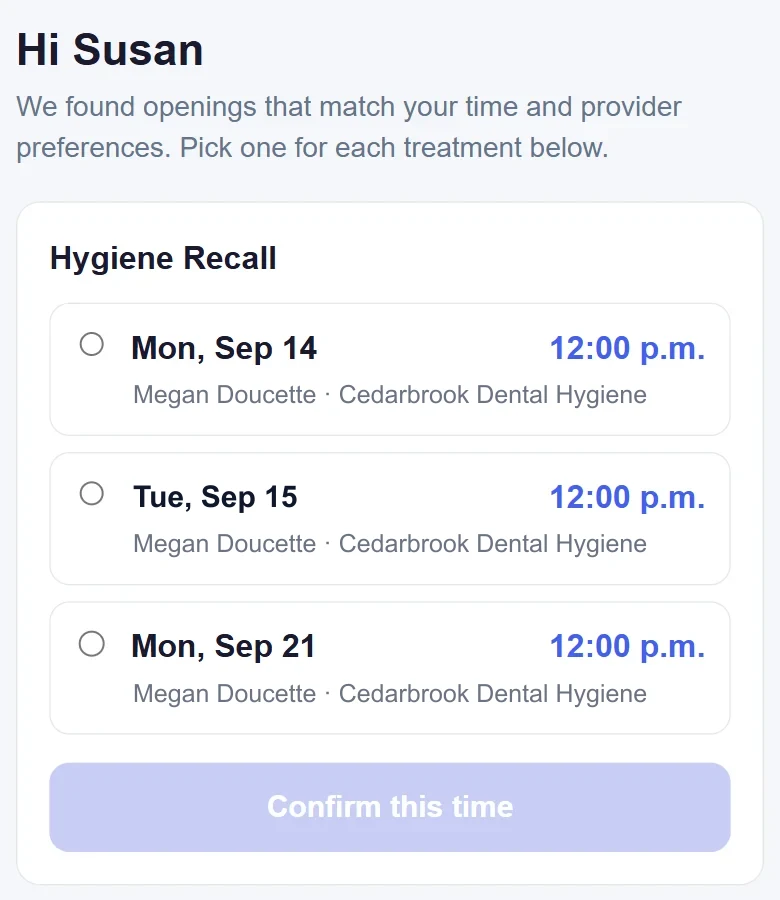
The appointments land in your schedule. You read them between patients instead of answering a call during one.
Recare that runs without you
In a dental office, the recall list belongs to someone at the desk. In a solo hygiene clinic it belongs to you, and it is the first thing to slip when the day gets busy. The patients you spent years building a relationship with quietly stop coming, and nobody notices until the schedule has holes in it.
MapleDent Cloud sends recare reminders automatically when a patient is due, with a link to book. The patient picks a time that works for them and the appointment appears in your schedule. Nobody made a call. Nobody kept a list on paper.
For the ones who do not book, the software keeps the list for you. Recare lists show who is due and not yet booked. There are lists of planned treatment that was never done. When you do sit down to call someone, you know who and why, instead of working through a spreadsheet you maintain yourself.
Recare is also the difference between a clinic that fills itself and one you have to fill. A hygiene practice runs on patients coming back. If the coming back is automatic, the practice is steadier than the person running it.
Let patients do the rest themselves
The rest of the front desk’s work is answering the same questions. When is my appointment. What did we do last time. Can you send me that form again.
The patient portal hands those back to the patient. They see their next appointment, their past and upcoming visits, their treatment plans, and their documents and images. They look it up themselves, at whatever hour they think of it.
Forms work the same way. Patients fill in and sign their forms on their own phone, on a clinic tablet or on a computer, and you can build your own templates. If you want a tablet in the operatory, the kiosk locks it with a PIN and locks itself again when the patient is done, so nothing else on that tablet is reachable.
None of this is a big feature on its own. Together it is most of the interruptions in a day, handled without you.
Notes that keep up with the day
Offloading the front desk only helps if the notes do not eat the time you saved.
Guided notes let you click through a visit’s choices, and each pick adds a finished sentence. Picks can open further choices, so a note is as short or as detailed as the visit was. You can build your own templates. Notes are started for you each morning, and the empty ones are removed if the patient cancels.
For a patient you last saw eight months ago, the Summary tab shows their visits at a glance: date, provider, visit type and a one-line note, with a link to the full note. You remember them before they sit down.
Perio, and showing the patient the change
Perio charting is done from the keyboard, as much or as little as you like, from pocket depths to plaque. Clinical attachment level is calculated for you, and negative values are allowed so overgrown gums chart properly.
The part patients remember is the comparison view. It puts today’s exam next to an earlier one and marks every site that improved in green and every site that got worse in red. You tell them to follow the green and the red, and they see what has changed since the last visit without a word of explanation from you. Colour blind mode is a click away, so no patient is left out.
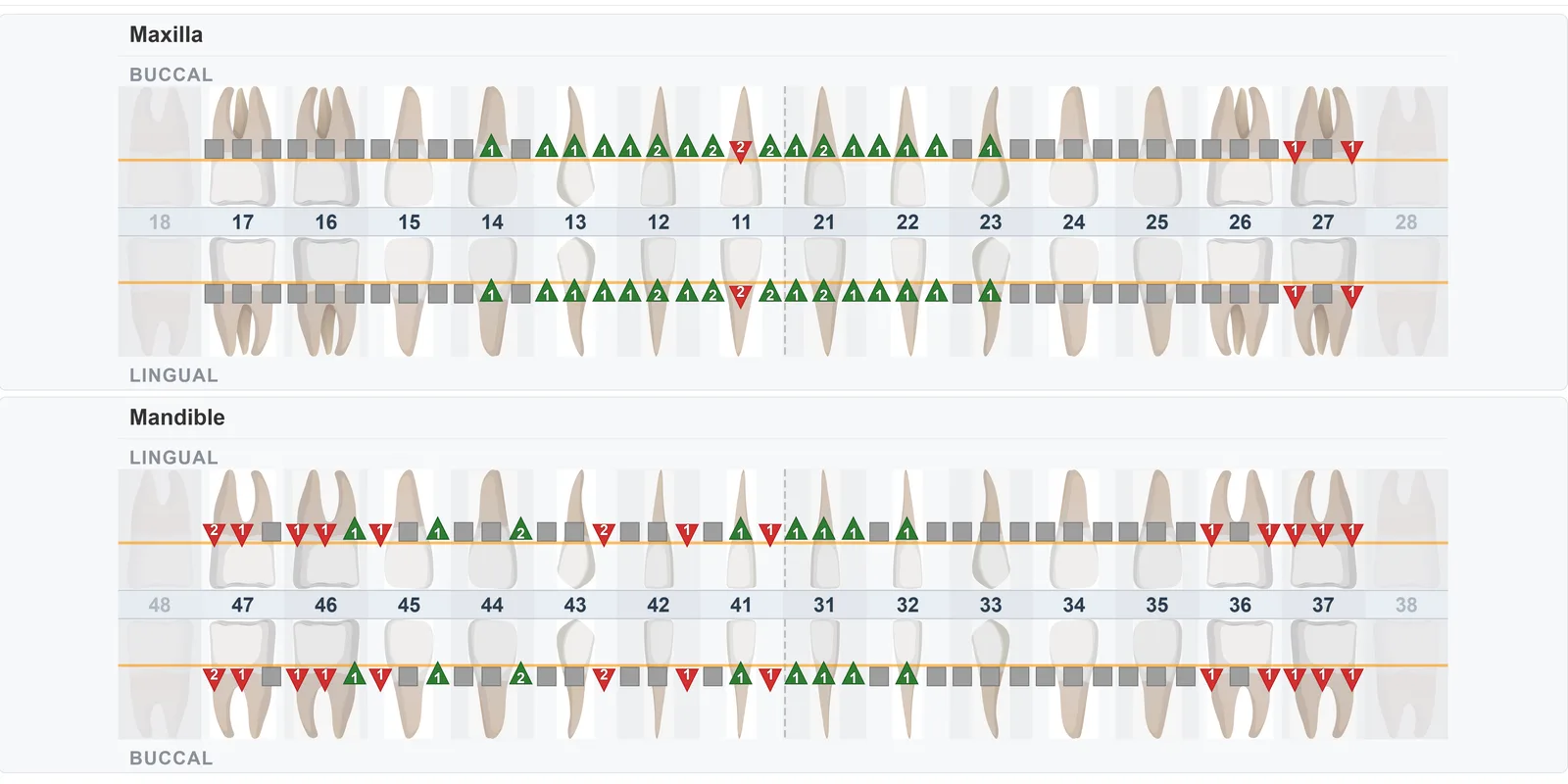
In an independent clinic you are the one who has to make the case for the next visit. A chart the patient can read does more of that than anything you say at the chair. Perio charting and the comparison view are on both plans.
Claims, and where you work
Dental hygiene claims travel through CDHAnet. Maple Dental Software is certified for CDAnet, CDHAnet and DACnet, so hygiene claims are sent electronically to insurers.
If you work on the move, the software has to move with you. MapleDent Cloud runs in the web browser on Windows and Mac computers, tablets and phones, with no server in the office and no fee for an extra computer. Imaging needs a Windows app on the computers that use it.
Patient data is stored in Canada, hosted by OVH in Beauharnois, Quebec. We publish our subprocessors, and we use no US companies for patient data. Ask your current software for the same list.
What it costs
There are two plans, and the difference matters for everything above.
- MapleDent Lite starts at $90 a month paid yearly, or $100 month to month. It covers the clinical side: guided notes, appointment summaries, perio charting and comparison, scheduling, claims, manual recare, the patient portal, task boards and team management.
- MapleDent Cloud starts at $180 a month paid yearly, or $200 month to month. It adds imaging and everything that runs on text messages: online booking, automatic recare reminders, two-way texting and cancellation recovery.
If the point is to run without a receptionist, that is the full plan. Lite is for a clinic that is happy booking its own patients and wants the notes and the charting done well.
Each additional hygienist adds $45 a month paid yearly. There are no fees per computer, screen, user or location, no fee for messaging, and no setup fee. The first month is free and there is no fixed-term contract. The rest is on the pricing page.
Moving over
Most independent hygienists are coming from paper, a calendar app, or software meant for a dental office that they pay too much for and use a fifth of.
Moving your data over is part of onboarding, to the maximum extent possible. Every new clinic gets two private onboarding sessions for its team, and a live group training session runs every week. Your clinic owns its records, and you can export them at any time.
Questions to ask before you buy
- Can patients book themselves, at times you control?
- Does recare go out on its own, with a way to book from the message?
- Can patients look up their own appointments, visits and documents?
- Can they fill in and sign forms on their own phone?
- Can you show a patient how their perio has changed since last time?
- Is it certified for CDHAnet?
- Does it need a server in the office? What does a second computer cost?
- Where is the data stored, and who are the subprocessors?
- What is the full monthly price for one hygienist, with messaging and training included?
- Can we export our data whenever we want?
See how MapleDent Cloud handles a hygienist’s day on the hygiene page.
Common questions
- What software does an independent dental hygienist need?
- Software that covers the front desk as well as the clinical work: online booking, automatic recare, a patient portal, guided notes, perio charting and CDHAnet claims. An independent hygienist usually has no receptionist, so the software has to do that job.
- Can patients book their own hygiene appointments online?
- Yes. In MapleDent Cloud patients book online at the times you choose to offer, and recare reminder texts carry a booking link. Online booking and automatic recare are part of MapleDent Cloud, not MapleDent Lite.
- How can I show a patient that their gums have improved?
- The perio comparison view puts two exams side by side and marks every site that improved in green and every site that worsened in red, with a colour blind mode. Perio charting and comparison are on both MapleDent Cloud and MapleDent Lite.
- How much does software for a hygiene clinic cost?
- MapleDent Lite starts at $90 a month paid yearly, or $100 month to month. MapleDent Cloud starts at $180 a month paid yearly, or $200 month to month. Each additional hygienist adds $45 a month paid yearly. The prices are on the pricing page.
- Does it send dental hygiene claims?
- Yes. Maple Dental Software is certified for CDAnet, CDHAnet and DACnet, so dental hygiene claims are sent electronically to insurers.
- Does it work for a mobile hygienist?
- Yes. MapleDent Cloud runs in the web browser on Windows and Mac computers, tablets and phones, with no server in the office. Imaging needs a Windows app on the computers that use it.
- Where is patient data stored?
- MapleDent Cloud stores data in Canada, hosted by OVH in Beauharnois, Quebec, and publishes its subprocessors.
Topics: independent hygienist, mobile hygienist, dental hygienist, hygiene clinic software, online booking, automatic recare, patient portal, guided notes, perio charting, perio comparison, CDHAnet claims, no receptionist, hygiene software cost, Canadian data hosting